

Everything posted by awordortwo
-
Title.
-
BCSO can handle both of these tasks until the server has a need for these factions to exist as their own. Federal agencies especially never go well.
-
We need to focus hard on what we have right now. I personally have no interest in engaging with a whole separate island, federal agencies or the like when we're already struggling to create roleplay in the county. This feels like stuff that should exist like, next year minimum.
-
Move the 0 over to the center bottom and the delete to the side, like a real pinpad! Also have a tap limit on your card so that you don't have to enter your PIN for payments under X amount.
-
T This is.. kind of a lot, even in a small crowd. Maybe also increase transparency based on distance.
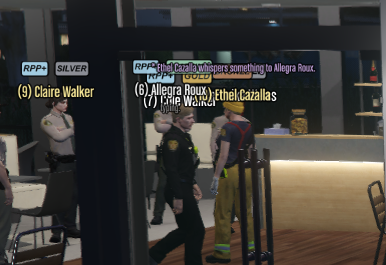
-
"*word*" to make italics "**word**" to bold. "***word***" to do both. "...-" or "--" to create an em-dash. Basically Markdown.
-
I find the dark camo green really hard to read for BCSO and would like to customize it accordingly. Thank.
-
I find the anim UI to be really slow for when I want to use an animation, and definitely can't be done in intense RP of any kind. I'd really just prefer a command with names I can remember rather than fiddling with a cumbersome UI.
-
35 is painfully slow. 45-50 please.
-
The current name and acronym are not only clunky to say, they're clunky to remember. I found myself typing projectroleplay.net for my good first 10 tries trying to get to this website before finally managing to instill this one into my brain. It's now or never when it comes to changing the name, so I figured might as well suggest it now.
-
This could be an unneeded layer of bureaucracy that'll end up bogging things down more than it solves, but. I find that persistently faction management teams become slow, burdensome or actively unaware of what the other is doing and make almost poisonous decisions as a result. I propose the creation of a new overarching "Faction Management" team, comprised of people with a proven track record of being involved in both sides of roleplay. They'd act like judges in a court, while most things should still be handled internally, they offer a higher degree of appeal for things like faction removal, for example. The faction's own management (Legal or Illegal) may be biased against the player appealing as it is 'their own faction type'. LFM & IFM should actively advocate and encourage their faction's requests, this does not always mean they'd be right in doing so. An example of where FM would be involved. IFM has approved an arson request against a local business who is purely legal. Given the attack is 'cross faction-type' it is forwarded to FM for final approval. FM reviews it and finds that the escalation is poor and one-sided, returning the result and the attack is never performed. Another example! FM collects feedback from both factions regarding a new clothing update and what changes they might see valuable. FM does their very best to sort out a fair result for both parties and brings that to the development team. Dunno, just spitballing.